

XtraMath Explained is a plain-English guide to the free math fact program that millions of kids know by heart, and sometimes dread. You will learn how student login works, who Mr. C really is, what XtraMath costs, and whether it helps kids learn. Each section answers its question on its own, so you can jump straight to what you need.
Quick answer: XtraMath is a nonprofit program for grades K-8 that builds fast recall of addition, subtraction, multiplication, and division facts in about 10 minutes a day. A free plan exists, and paid Pro plans add extra tools for teachers and parents.
1. What Is XtraMath and What Does It Actually Teach?
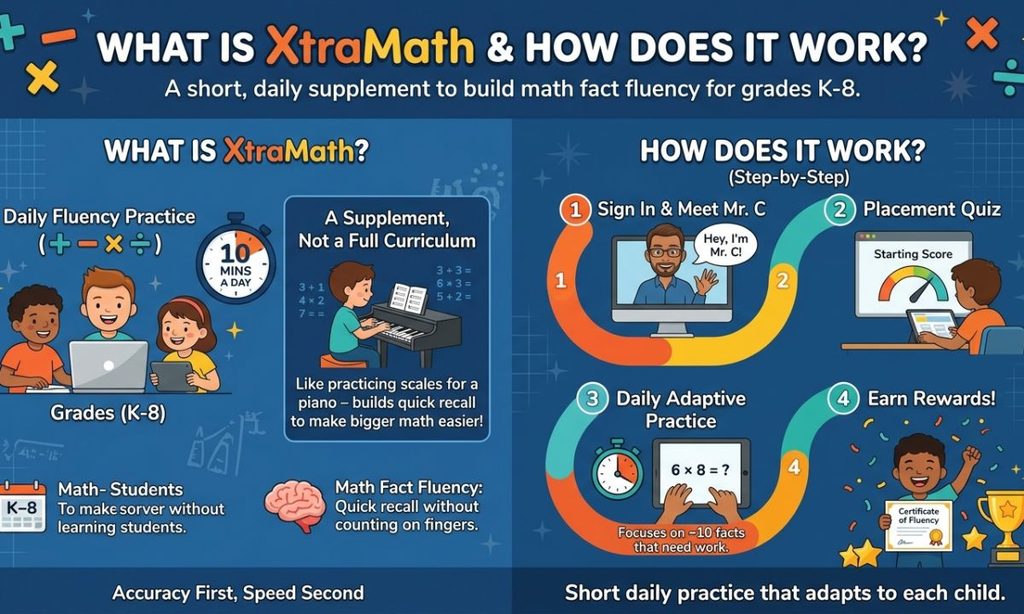
XtraMath is a nonprofit online program that helps students in grades K-8 recall basic math facts quickly. It covers addition, subtraction, multiplication, and division. The goal is math fact fluency, which means the answer comes to mind without counting or calculating.
David Jeschke, a former Microsoft programmer, founded it in 2007 after tutoring Seattle students who still counted on their fingers. XtraMath Explained in one line: short daily practice that adjusts to each child.
What XtraMath Does Not Try to Replace
XtraMath does not teach why fractions work or how to solve word problems. It is a supplement, not a full curriculum. Think of it like scales for a piano player. It builds the quick recall that makes bigger math easier, while the classroom teaches the reasoning.
XtraMath Explained: How Does XtraMath Work, Step by Step?
XtraMath works in short daily sessions that adapt to the student. Here is the basic flow:
- The student signs in and meets Mr. C, the on-screen math coach.
- A placement quiz sets a starting fluency score. It is split into short parts over the first few sessions.
- Each later day begins with a two-minute progress quiz.
- XtraMath picks about 10 facts that need work and practices them.
- The student earns trophies for milestones and a certificate when an operation is finished.
What Happens During the Session?
A session takes about 10 minutes or less and is meant to happen once a day. It has a few quiz and practice activities, each lasting roughly two minutes. A timer shows how long the student has, and if time runs out the correct answer appears so the student can type it and move on.
XtraMath Explained for Students: How to Use XtraMath
To use XtraMath, sign in, watch Mr. C’s short intro, and answer each fact as fast as you can while staying accurate. Finish the daily session and stop. More practice in one sitting does not help much.
Student tip: Accuracy first, speed second. If you know a fact, type it right away. If you do not, wait for the answer, copy it, and you will see that fact again soon.
Read Also This Blog Rizz Meaning
2. How Do You Log In to XtraMath as a Student?
Students sign in on the Student Sign In page at xtramath.org using three things: their name, a teacher or parent email, and a 4-digit PIN. The name must match how it appears in XtraMath. The email belongs to the adult, because XtraMath does not collect student email addresses.
What You Need for Student Sign In
Here is the full checklist for student login:
| Item | What to enter |
| Name | Exactly as listed in XtraMath, often a first name or first name plus last initial |
| The teacher’s email, or the parent’s email if the family enrolled | |
| PIN | The 4-digit number from the class or family report |
Teachers and parents can find PINs in the student report after signing in to their own account.
Can Students Use Google, Clever, or ClassLink?
Yes. XtraMath supports Google sign-in, Clever, and ClassLink. Clever and ClassLink work best when students are already signed in to those portals. Google sign-in is linked one student at a time, since XtraMath does not roster classes through Google Classroom.
The first time a student taps the Google button, they enter their XtraMath credentials once to link the accounts. After that it works automatically. These options are not ideal on shared devices because students may open the wrong account.
What If You Are Signing In at Home?
At home, the student uses the same Student Sign In page, or taps their name on a trusted family device. Parents create a free family account, add each child, and share the PIN. Checking Remember me makes the next login a single tap.
Tip: Remember me only works if the browser allows saved data. Private or Incognito mode will block it.
3. Why Is XtraMath Student Login Not Working?
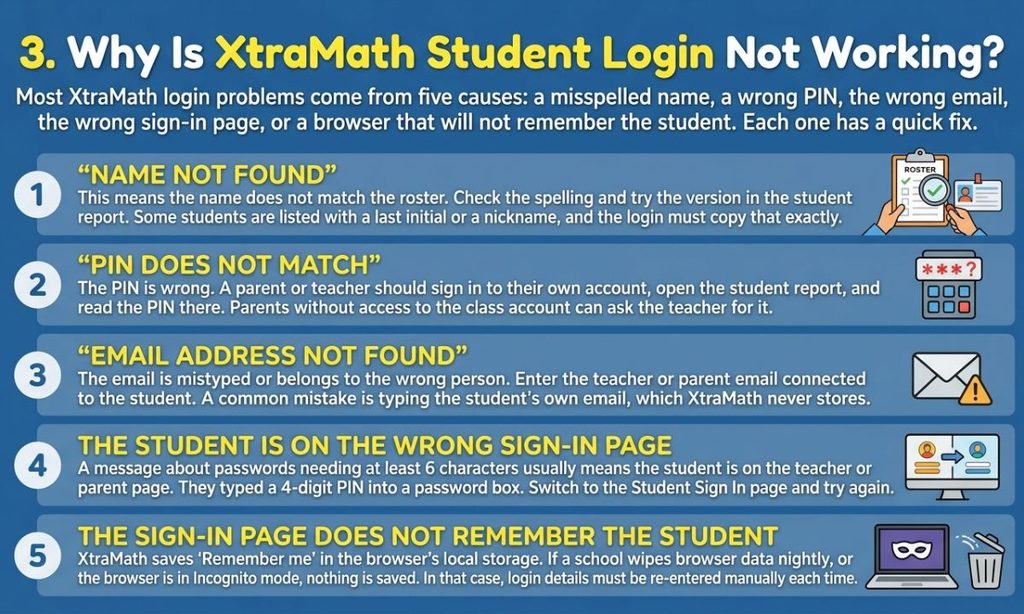
Most XtraMath login problems come from five causes: a misspelled name, a wrong PIN, the wrong email, the wrong sign-in page, or a browser that will not remember the student. Each one has a quick fix.
“Name Not Found”
This means the name does not match the roster. Check the spelling and try the version in the student report. Some students are listed with a last initial or a nickname, and the login must copy that exactly.
“PIN Does Not Match”
The PIN is wrong. A parent or teacher should sign in to their own account, open the student report, and read the PIN there. Parents without access to the class account can ask the teacher for it.
“Email Address Not Found”
The email is mistyped or belongs to the wrong person. Enter the teacher or parent email connected to the student. A common mistake is typing the student’s own email, which XtraMath never stores.
The Student Is on the Wrong Sign-In Page
A message about passwords needing at least 6 characters usually means the student is on the teacher or parent page. They typed a 4-digit PIN into a password box. Switch to the Student Sign In page and try again.
The Sign-In Page Does Not Remember the Student
XtraMath saves Remember me in the browser’s local storage. If a school wipes browser data nightly, or the browser is in Incognito mode, nothing is saved. In that case, use Clever or Google sign-in if the school offers it, or just type the details each time.
Read Also This Blog What Does SOS Mean
4. Who Is the XtraMath Guy, and Who Is Mr. C?
Mr. C is the on-screen math coach who guides every XtraMath student. For years he was a real teacher in live-action videos, and since October 2023 he has been an animated character. People online call the original version “the XtraMath guy.”
Who Was the Original Live-Action Mr. C?
XtraMath’s official account said in 2017 that the live-action Mr. C is Christopher Robert, a National Board Certified Teacher in the Seattle School District. He was honored as a “Hero in the Classroom” in 2009. XtraMath says his video was the friendly face of the program from 2012.
Some websites spell the surname with an s at the end. XtraMath’s own post uses Robert.
Who Is the Current Mr. C? (Who Is the XtraMath Guy Now?)
The current Mr. C is a 2D animated math coach. XtraMath announced him on October 16, 2023. The studio Essence Cartoons created the character, and the voice comes from an AI voice tool called ElevenLabs.
Why Did the XtraMath Guy Get Replaced?
XtraMath said it wanted to modernize and to support a growth mindset while lowering math anxiety. The new script praises progress over speed, though students are still expected to answer within the set time. XtraMath also said it reached an updated agreement with the original Mr. C.
What Happened to the XtraMath Guy?
The live-action videos were retired, and the man in them became an internet meme starting around 2019. XtraMath publicly thanked him for his contributions. There is no verified public update on his life since then, and he deserves privacy, so treat random claims with caution.
Where Can You Watch the XtraMath Videos on YouTube?
XtraMath runs an official YouTube channel called XtraMath_USA with its explainer videos. Fan-made compilations of the old Mr. C videos also exist, uploaded by viewers around 2020. Because fans post them, availability can change.
5. Who Created XtraMath, and Does It Still Exist?
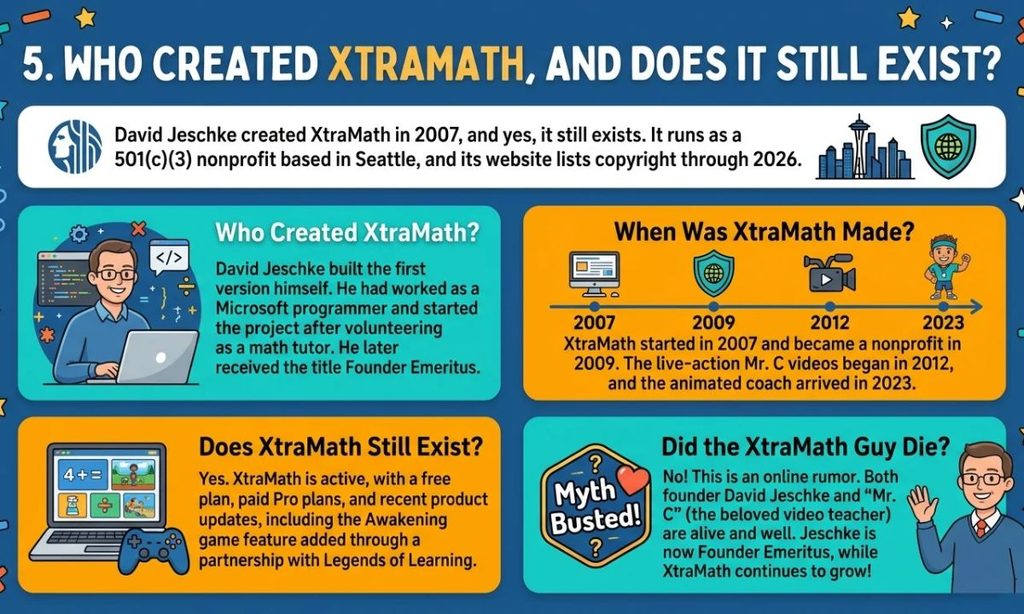
David Jeschke created XtraMath in 2007, and yes, it still exists. It runs as a 501(c)(3) nonprofit based in Seattle, and its website lists copyright through 2026.
Who Created XtraMath?
David Jeschke built the first version himself. He had worked as a Microsoft programmer and started the project after volunteering as a math tutor. He later received the title Founder Emeritus.
When Was XtraMath Made?
XtraMath started in 2007 and became a nonprofit in 2009. The live-action Mr. C videos began in 2012, and the animated coach arrived in 2023.
Does XtraMath Still Exist?
Yes. XtraMath is active, with a free plan, paid Pro plans, and recent product updates, including the Awakening game feature added through a partnership with Legends of Learning.
Did the XtraMath Guy Die?
I found no reliable report that the man who played Mr. C has died. People often mix this up with a real event: XtraMath announced that its founder, David Jeschke, passed away in December 2024. These are two different people.
Read Also This Blog FN Meaning in Slang
6. How Do Teachers and Parents Use XtraMath, and Does It Work on a Phone?
Teachers and parents create a free account, add students, and let XtraMath assign a starting program by grade. They then check reports to see progress. XtraMath is a web program, so it runs in a browser on phones and tablets too, though a larger screen is easier for typing answers.
XtraMath Explained for Teachers: Class Setup and Reports
Teachers sign up, choose Add class, then add students and their grades. XtraMath assigns a default program and generates a random PIN for each child. Reports include student, class, and date views, and automated reports are free.
For shared classroom computers, teachers can set up Classroom Sign In, where students pick their name from a list and enter a PIN.
XtraMath Explained for Parents: Family Accounts
Parents create a free family account and add their children. The free plan covers three children. Parents can view reports and adjust settings, and they can upgrade to Pro later without losing progress.
What Are Programs, Difficulty Levels, and Timer Thresholds?
A program is the set of operations a student practices. The difficulty level is the size of the fact set (Beginning, Regular, or Expanded). The timer threshold is how many seconds a student gets per fact.
| Setting | Options | Who it suits |
| Timer threshold | 12, 6, 3, 2, or 1.5 seconds | 12 seconds for early learners, shorter for advanced students |
| Difficulty level | Beginning, Regular, Expanded | Matches how many facts are practiced |
| Program length | Adaptive practice or placement quiz only | Practice vs. checking a level |
The default is 6 seconds. Free accounts use the preset programs, while Pro unlocks custom ones.
What Is Awakening (Legends of Learning) in XtraMath?
Awakening is an optional game world from Legends of Learning that students can enter only after finishing their daily XtraMath session. A teacher or parent must switch it on, and it is free. It reinforces K-8 math through games, and on iPads it requires the dedicated Legends of Learning app.
Can You Use XtraMath on a Phone?
Yes, in most cases. Open the Student Sign In page in a phone browser, or check your app store for an official XtraMath app, since app availability has changed over the years. A tablet or computer is more comfortable for a timed number keypad.
7. Why Do Some Students Hate XtraMath, and Is It Actually Good for Learning Math?
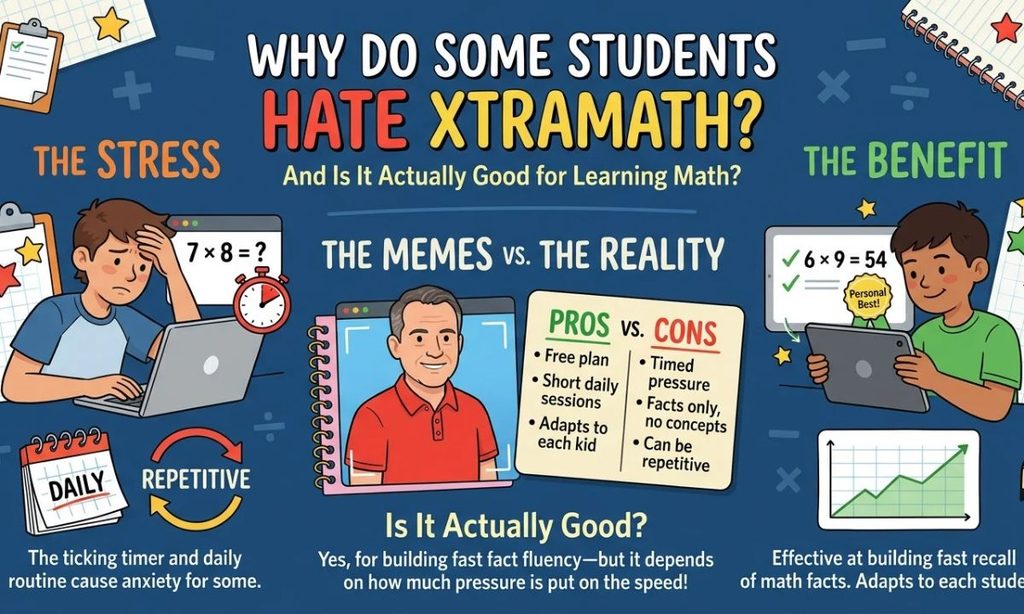
Some students dislike XtraMath because it is timed, repetitive, and daily. It is still effective for its narrow purpose, which is building fast recall of math facts. How well it works depends on how much pressure surrounds it.
Is XtraMath Good or Bad? The Short Answer
XtraMath is good at fact fluency and not designed for anything else. XtraMath reports that over 95% of surveyed teachers say it helps students reach grade standards, though that is the organization’s own survey. The honest downside is that timers stress some kids.
Why Do People Make XtraMath Memes?
The memes grew from Mr. C’s slow, serious delivery and his red polo shirt. A 2019 video and a viral 2022 TikTok clip about typing wrong answers on purpose pushed the jokes into the mainstream. Most of them are about school nostalgia, not about the real person.
What Does XtraMath Do Differently?
XtraMath picks facts for each child, repeats them at spaced intervals, and measures response time instead of only right or wrong. Students are not ranked against classmates, only against their own best. It is also nonprofit and free to start.
XtraMath Pros and Cons
| Pros | Cons |
| Free plan available | Timed practice can cause stress |
| Short daily sessions | Teaches facts only, not concepts |
| Adapts to each student | Repetitive for some children |
| Reports for parents and teachers | Custom settings need a paid plan |
| Accessibility settings and captions | No mixed operations in one activity |
What Should You Understand About XtraMath Before Judging It?
XtraMath is one tool for one job. It works best beside regular math teaching, not instead of it. Watch how your child reacts. If practice causes tears or dread, lower the pressure rather than pushing harder.
Key takeaway: The program is not the problem or the solution. The stress level around it usually decides whether kids benefit.
Read Also This Blog What Does MDSA Mean
8. How Do You Pass a Level in XtraMath, and How Can You Make It Less Stressful?
To pass a level in XtraMath, answer the facts correctly within the timer threshold across your daily sessions. The program moves you forward as it sees quick, accurate recall. Rushing and guessing usually slows progress.
How Do You Pass a Level in XtraMath?
Keep your sessions regular and aim for correct answers inside the time limit. XtraMath tracks how fast you answer each fact, so it knows when a fact is truly learned. A finished operation earns a certificate.
- Practice once a day for the full session.
- Type answers you know right away.
- Copy the shown answer when you miss, so you learn it.
- Do not mash random keys. The program can tell, and the teacher or parent gets notified.
How to Make XtraMath Less Stressful for Your Child
Pick a calmer setup and keep the tone light. Teachers and parents can hide the timer, choose a 12-second threshold, and turn off flashing animations. Optional captions are available on the Mr. C videos.
Parent tip: Praise the streak and the progress, never the speed. Five calm minutes beats ten tense ones.
Can You Cheat on XtraMath?
You could try a calculator or a helper, but it defeats the point. XtraMath measures response time, so unusual patterns show in the reports that adults see. You also would not build the recall that makes later math easier. If the timer feels too tight, ask for a longer threshold instead.
9. How Much Does XtraMath Cost, and Is It Safe and Worth Choosing?
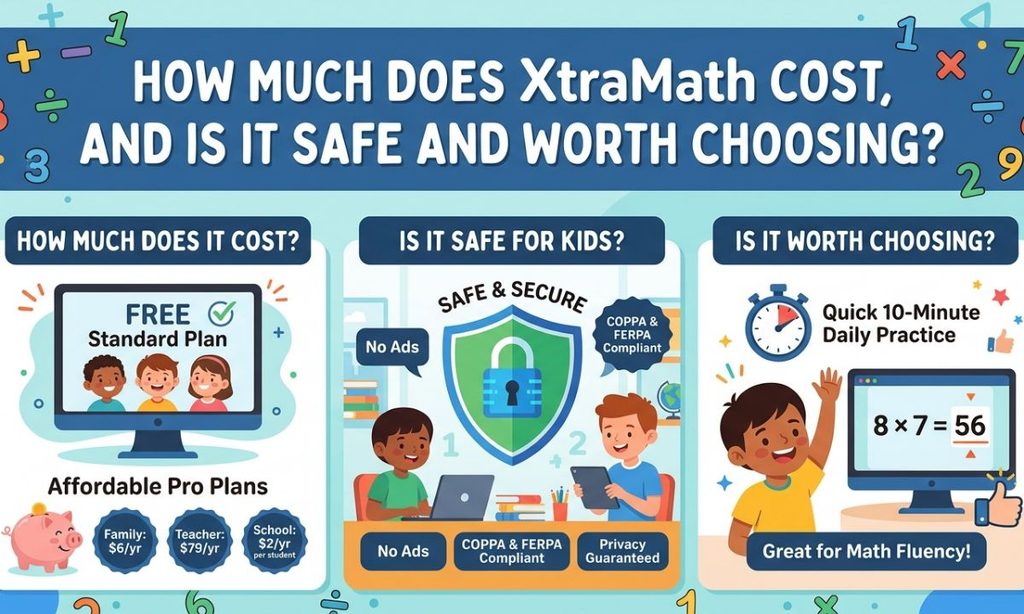
XtraMath has a free plan that works forever, plus low-cost Pro plans. It is built to be safe for children, and it is worth choosing if your goal is simple daily fact practice.
How Much Does XtraMath Cost? Is XtraMath Free?
Yes, XtraMath is free to start. The free Standard plan includes automated reports, the Awakening game, accessibility settings, and Clever and ClassLink access.
| Plan | Price | What it adds |
| Standard | Free | Reports, Awakening, accessibility, up to 3 children or 50 students |
| Family Pro | $6 per year | 3 children, unlimited student programs, priority support |
| Teacher Pro | $79 per year | 50 students, printables, classroom resources |
| School Pro | $2 per student per year | School-wide tools and usage reports |
Extra students on Pro cost $2 each per year. A $50 teacher price was advertised through October 1, 2026, so check the pricing page for the current offer. XtraMath’s older materials call these plans Premium.
Read Also This Blog Sapiosexual Meaning
Is XtraMath Safe for Students?
Yes, XtraMath says it complies with COPPA, FERPA, and other student data laws, and that it does not sell or share student data. It does not collect student emails. As a nonprofit, it is also known for showing no advertising to students.
XtraMath vs Other Math Learning Tools
| Tool type | Best for | How it differs |
| XtraMath | Daily fact fluency | Short, plain, adaptive, mostly free |
| Game-based apps like Prodigy or Reflex | Motivation through play | More game elements, often with paid memberships |
| IXL | Broad skill practice | Wider topics, subscription based |
| Khan Academy | Concept lessons | Video explanations and free practice |
Many families use XtraMath alongside a concept-focused tool.
What Should Parents and Students Know Before Using XtraMath?
Expect about 10 minutes a day, a timer, and a coach who cheers on progress. Start on the free plan and upgrade only if you need custom programs. Talk with the teacher if the timer causes worry, since adjustments are easy.
Frequently Asked Questions
Is XtraMath free?
Yes. The Standard plan is free forever and includes reports and the Awakening game. Pro plans add customization and printable resources.
How do I find my child’s XtraMath PIN?
Sign in to the parent or teacher account and open the student report. The 4-digit PIN is listed there. If you cannot access the account, ask the child’s teacher.
Who is Mr. C on XtraMath?
Mr. C is the math coach on screen. The original was a live-action video of teacher Christopher Robert, and since October 2023 the coach has been animated.
Is XtraMath good for learning math?
It is good for building quick recall of basic facts. It does not teach concepts, so use it alongside classroom lessons and keep the pressure low.
How long should a child use XtraMath each day?
About 10 minutes or less, once a day. Short and regular beats long and rare.
Conclusion
XtraMath Explained comes down to this: it is a free, nonprofit tool with one clear job, helping kids recall math facts fast. Login problems almost always trace back to a wrong name, PIN, email, or page. The famous Mr. C is now animated, and the program offers ways to ease the stress for anxious kids.
Start with the free plan, keep sessions short, and watch how your child feels. If it builds confidence, great. If not, adjust the timer or talk to the teacher.
